Connect
Connect the Control App to a compatible SafeSight capture system.
 FIELD INTELLIGENCE / ONLINE
Mine Scanning Software 01
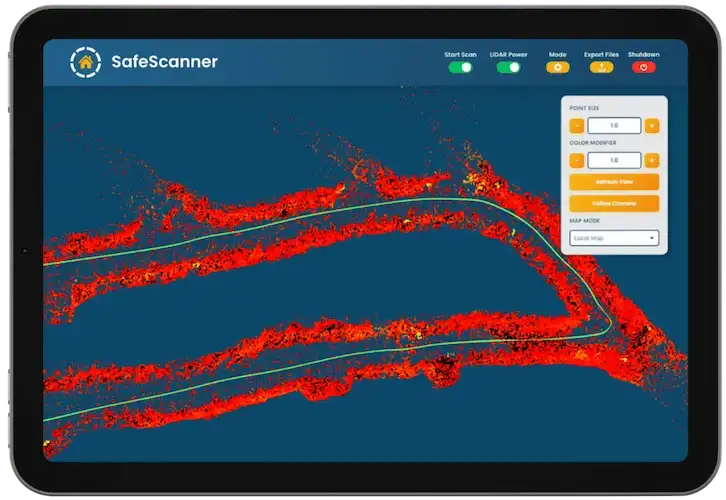
The SafeSight Control App gives underground operators direct control over compatible SafeSight scanning workflows while displaying the developing 3D point cloud in real time.
Connect. Command. Watch. Verify.
Point Cloud Visibility
Geometry Verification
Supported Field Exports
Underground Native
02 Operating context / field challenge
The scanner stops. The equipment leaves the heading. The data reaches the office.
Then someone discovers a surface or area was not captured as expected. The cost is no longer a few missing points. It can become:
03 Workflow / Field control
Connect the Control App to a compatible SafeSight capture system.
Start and stop supported scanning operations directly from the app.
See the point cloud develop through SafeSight Live Render.
Evaluate whether the required underground geometry appears to have been captured.
Move supported field data into the next stage of the survey workflow.
04 Technology / Live verification
SafeSight Live Render provides a real-time representation of the developing point cloud during compatible underground scanning.
Instead of separating capture from the first data review, Live Render allows the operator to see the geometry while the scan is still taking place.
05 Quality control / field confidence
Real-time visualization gives the operator an immediate way to evaluate the developing dataset.
The Control App does not replace professional survey validation. It provides the field operator with immediate visual feedback from compatible capture systems.
Real-time point-cloud visualization is intended to support field decisions. It is not the final cleaned, geo-referenced and processed survey dataset.
Field control + initial verification.
Mine point-cloud processing and alignment.
Data management + visualization.
Final technical use in survey / engineering software.
06 Ecosystem integration / supported systems
Use the Control App with compatible SafeScanner scanning workflows to control capture and see the developing point cloud.
Explore SafeScanner →Use compatible SafeSight software during underground drone mapping to review scan information while the mission is underway.
Explore DBV Mapping →Use compatible SafeSight software workflows to review captured raise inspection and mapping information.
Explore Rail Runner →Describe the broader SafeSight data workflow when collecting spatial data with ground-based robotic platforms.
Explore DeepTraxx →07 Field applications / operational environments
Review mobile LiDAR capture as geometry develops along underground routes.
Learn about surveying →Review compatible DBV scan information during aerial underground mapping.
Use approved SafeSight visualization workflows where applicable during shaft scanning.
Learn about shaft inspection →Review compatible SafeSight data associated with Rail Runner operations.
Monitor compatible spatial capture when the sensor is operating away from the person reviewing the data.
08 Next steps / data handover
Once capture is complete, supported field outputs can move into Eclipsed or compatible downstream workflows for detailed processing and engineering use.
The current production page lists LAS, PCD and PTS. Verify the latest supported formats before publication.
The SafeSight Control App is responsible for the field stage. Eclipsed handles the processing stage. After capture, move underground scan data into Eclipsed to clean, downsample, geo-reference, measure and prepare the mine point cloud.
After capture and processing, NimbVault gives mine teams a secure environment for organizing, viewing and retaining spatial data. The Control App starts the digital workflow underground. NimbVault preserves the result afterward.
09 Technical definitions / questions answered
Mine scanning software connects spatial-data capture systems with the people operating or reviewing them.
Depending on the workflow, mining scanning software can support:
It should be distinguished from post-processing software, which works with the resulting point cloud after capture.
When scan data is reviewed only after the field crew leaves an underground work area, a missing surface or incomplete scan can require additional access.
Real-time visualization gives the operator an early view of the captured geometry while the scanning system remains in position.
Mine surveying software is a broad category that can include survey calculation, mine design, adjustment, modeling and planning tools.
SafeSight Control App has a narrower role: control the scan, see the data, verify the field capture, export the result.
The SafeSight Control App is SafeSight's field software layer for controlling compatible underground scanning workflows, viewing the developing point cloud and evaluating capture before field equipment leaves the work area.
Yes. SafeSight Live Render displays the developing point cloud during compatible capture workflows.
Detailed point-cloud processing is handled by Eclipsed. The Control App focuses on capture, field control, visualization and verification.
No. Live visualization helps an operator evaluate scan coverage and identify potential gaps. Final completeness depends on the survey requirements, environment and workflow.
The current production page lists LAS, PCD and PTS. Verify the latest supported formats before publication.
No. The Control App operates at the capture and field-verification stage of the broader mine-survey workflow.
10 / WORKFLOW REVIEW
If your current process requires someone to wait until the data reaches the office before knowing whether the required geometry was captured, show SafeSight that workflow.
We will review where real-time mine scanning and field verification could fit.